
by Research Team | Oct 1, 2026 | PPC and Paid Ads
A great ad and a great landing page can still work against each other. This happens when they don’t say the same thing.
Here is what landing page pay-per-click (PPC) alignment actually means. We’ll cover the common mismatches that quietly break the connection, and why fixing this costs less than most businesses expect.
What landing page PPC alignment actually means
Landing page PPC alignment means the landing page continues the exact promise made in the ad. It’s not enough for the page to be broadly related to the ad.
This is sometimes called message match. An ad that promises a specific offer, service, or benefit should lead to a page that confirms it immediately. The page should use the same language as the ad.
A visitor who clicks an ad has already formed an expectation. Alignment confirms that expectation was correct, rather than leaving the visitor to figure out whether they landed in the right place.
Common mismatches that quietly break the connection
A common mismatch is an ad promoting a specific offer while the landing page shows a general category page instead. An ad for PPC management for ecommerce that lands on a broad services page is a clear example.
Terminology mismatches cause similar friction. If an ad uses one set of language and the landing page uses different terminology, the visitor has to do extra work. They shouldn’t have to work just to confirm they’re in the right place.
A PPC ads agency reviewing an account will often find this exact pattern. Strong, specific ad copy gets paired with a landing page that was never built to match it directly.
Why this mismatch costs more than a lower conversion rate
A mismatch doesn’t just cost conversions. It can also affect how efficiently ad budget gets spent, since landing page experience influences how platforms evaluate and price each click.
This creates a compounding effect. A weak landing page match can reduce how many visitors convert, while also increasing how much each click costs to acquire.
Fixing alignment tends to help both problems at once. A better-matched landing page can improve conversion rate. It can also lower cost per click, since both issues often share the same root cause.
What this looks like in practice for a PPC account
An account had a strong click-through rate across several ad groups. But conversion rate stayed persistently weak, despite reasonably compelling ad copy.
A closer review found that every ad in the account linked to the same general homepage. This happened regardless of what the specific ad group actually promoted. Visitors clicking a highly specific ad landed somewhere far more generic than expected.
Once landing pages were rebuilt to match each ad group directly, conversion rate improved noticeably. Each page reflected the exact offer and language used in its ad. This happened within the same overall budget.
The ads had never been the weak point. The disconnect between what they promised and where they led was quietly undoing their own performance.
What to check to confirm alignment
The headline is the first thing worth checking. It should immediately confirm the same promise made in the ad, without making the visitor scroll or search for it.
The offer itself should match exactly, not approximately. An ad promoting a specific service or price point should lead to a page confirming that same detail. A vaguer version of it won’t hold up.
The next step should be obvious. A visitor who has already confirmed they’re in the right place should immediately understand what to do next. That might mean filling out a form or requesting a call.
Alignment should be checked at the ad group level, not just once for the whole account. One well-matched landing page says nothing about whether every other ad group is equally well aligned.
Frequently asked questions
Advertisers tend to ask similar questions once they notice ads performing well but conversions lagging.
What is message match in PPC?
Message match refers to how closely a landing page continues the exact promise made in the ad. That includes the offer and the language used to describe it.
Can a mismatched landing page affect ad performance?
Yes. Landing page experience is one of the factors platforms use to evaluate ad quality. A mismatch can affect both conversion rate and cost per click as a result.
Should every ad group have its own landing page?
Ideally, yes. At minimum, each ad group needs a landing page that closely matches its offer and language. One generic page serving the whole account won’t do the job.
What’s the fastest way to check if my ads and landing pages match?
Read the ad, then immediately view the landing page it leads to. Check whether the headline and offer confirm exactly what the ad promised, that’s the quickest way to spot a mismatch.
Key Takeaways
– Landing page alignment means the page continues the exact promise made in the ad, not just something related to it.
– Common mismatches include generic landing pages and terminology that doesn’t match the ad’s language.
– A weak match can affect both conversion rate and cost per click, compounding the cost of the problem.
– Alignment should be checked at the ad group level, not assumed to be consistent across an entire account.
Make sure your landing pages aren’t undoing your ads
Strong ad copy can only do so much if the landing page behind it doesn’t confirm what the ad promised. Schedule a Call to see where that connection might be breaking down in your account.

by Research Team | Sep 22, 2026 | Marketing Strategy, PPC and Paid Ads, SEO
A keyword list only shows what an advertiser is targeting. A search terms report shows what people actually typed. The gap between the two is often where budget quietly leaks.
Here is what a pay-per-click (PPC) search terms report actually shows, what to look for when reviewing it, and how it connects to ad relevance and negative keywords.
What a PPC search terms report actually shows
A search terms report shows the actual search queries that triggered an ad, as distinct from the keywords being targeted in a campaign.
Keyword match types determine how loosely a targeted keyword can trigger these queries. According to Google Ads Help, match types dictate how closely a keyword needs to match a search query for an ad to be considered in the auction. Broader match types capture more related searches than narrower ones.
This distinction matters because a keyword list alone tells an advertiser almost nothing about what actually triggered a given click. The search terms report is where that reality becomes visible.
What to look for when reviewing the report
Irrelevant queries are the first thing to scan for. A campaign targeting digital marketing audit might also show for searches like free audit template or audit checklist jobs, neither of which reflects someone looking to hire.
Queries with strong intent that are not yet targeted keywords deserve attention too. A recurring, high-intent search term that keeps appearing organically in the report may be worth adding directly as its own keyword.
An isolated irrelevant query is usually not worth acting on right away. A pattern across several similar irrelevant queries, though, is a signal that a match type or targeting setting needs adjustment.
How the report connects to ad relevance and negative keywords
A search terms report full of irrelevant queries usually signals a match type or targeting issue, not just bad luck in who happened to click.
A PPC ads agency reviewing an account will typically treat the search terms report as a starting point for two separate but related tasks: tightening match types and building out a negative keyword list.
The report itself is the same data source behind both efforts. Reviewing it consistently is what makes either one possible in the first place. This kind of budget-leak cleanup is one of the recurring themes Michelle Chance-Sangthong writes about in her book on getting more from an existing marketing budget — small structural fixes tend to outperform bigger spend.
What this looks like in practice for a PPC account
An account had steady spend and a healthy volume of clicks, but conversion rate stayed persistently low despite reasonably strong ad copy.
A review of the search terms report found it full of loosely related queries triggered by overly broad match types. Many of the triggering searches had little to do with what the campaign was actually meant to sell.
Once match types were tightened and the report began getting reviewed on a regular cadence, wasted spend on irrelevant queries dropped, and conversion rate improved without any change to the total budget.
The clicks had never been the problem. The queries triggering those clicks simply were not the right ones to begin with.
What to do with what the report shows you
Genuinely new, high-intent queries that show up repeatedly are worth adding directly as their own keywords, since they represent demand the campaign was not deliberately targeting yet.
Irrelevant patterns should be flagged for exclusion, either through tighter match types or through a negative keyword list built from exactly this kind of recurring, unwanted query.
A consistent review cadence matters more than any single fix. The report is only useful if someone actually looks at it regularly, since new irrelevant queries and new opportunities both tend to appear as a campaign continues running.
Frequently asked questions
Advertisers tend to ask similar questions once they start reviewing a search terms report for the first time.
What is the difference between a keyword and a search term?
A keyword is what an advertiser is targeting. A search term is what a person actually typed into the search engine that triggered the ad. The two often differ, sometimes significantly.
What are keyword match types?
Broad, phrase, and exact match are the three main match types, each determining how closely a search query must resemble a targeted keyword before an ad can be considered for that search.
How often should I review my search terms report?
A weekly or biweekly review works well for most active accounts, though the right cadence depends on how much traffic and spend a campaign generates.
Should every new search term become a keyword?
No. Genuinely high-intent, recurring terms are worth adding, but not every query that appears in the report deserves that treatment. Selective judgment matters more than adding everything indiscriminately.
Key Takeaways
– A search terms report shows what people actually typed, not just what an advertiser is targeting.
– Match types determine how loosely a keyword can trigger unrelated search queries.
– A recurring pattern of irrelevant queries usually signals a targeting issue worth fixing.
– The report only helps if it gets reviewed on a consistent, ongoing basis.
Get a clearer picture of what your ads are actually triggering
A keyword list only tells half the story. Get an Audit and get a clear picture of where your search terms report says your budget is actually going.

by Research Team | Sep 17, 2026 | Marketing Strategy, PPC and Paid Ads
Marketing ROI is one of the hardest numbers in a business to pin down honestly, even though it’s one of the most common things an owner wants to know.
Here is why marketing ROI tracking breaks down in the first place, what attribution actually means, and where the technical gaps usually hide.
Why marketing ROI tracking breaks down in the first place
Multiple channels typically touch a single sale. A customer might see a PPC ad, later find the site through organic search, and finally convert after a direct visit weeks afterward.
Most tracking setups cannot credit every one of those touchpoints properly. A single conversion gets attributed to whichever channel the tracking happens to catch, which is rarely the whole story.
This is not usually a lack of effort. It is a lack of the right measurement structure, built to reflect how customers actually move through multiple channels before they buy.
A digital marketing audit often surfaces this exact gap, since it looks across channels rather than evaluating SEO, PPC, and other efforts in isolation.
The attribution problem, explained simply
Attribution modeling is the process of deciding which touchpoint gets credit for a conversion when more than one channel was involved.
Last-click attribution gives all the credit to the final touchpoint before a sale. First-click attribution gives all the credit to the very first one instead. Neither tells the full story on its own.
A last-click model can make a channel that only closes sales, like direct traffic, look far more valuable than it actually is, while undervaluing the channels that generated the interest in the first place.
Choosing one model and understanding its blind spots is more useful than assuming any single model captures the complete picture.
The tracking gaps that quietly break ROI reporting
Broken conversion tracking is the most common technical culprit. A tracking pixel that stops firing correctly can silently erase weeks of accurate data before anyone notices.
Missing UTM parameters create a similar problem. Traffic that should be credited to a specific campaign instead gets lumped into generic categories like direct or referral traffic, distorting the picture for every channel involved.
Offline conversions compound the issue further. A sale that closes over the phone or in person, after being generated online, often never gets tied back to the campaign that started it.
A single broken tracking piece can distort ROI reporting for an entire channel, making a genuinely effective effort look far weaker than it actually is. Checking that pixels fire correctly and that every campaign carries a UTM tag are the first two places to look before assuming a channel isn’t working.
What this could look like in practice across marketing channels
Picture a hypothetical business that becomes convinced its PPC campaigns are not working, based on last-click data showing very few direct conversions from paid clicks.
A closer review finds that PPC is actually initiating a large share of sales that close weeks later through other channels. Customers often research further and return through organic search or a direct visit before finally converting.
Once attribution is reviewed more carefully across a longer window, the picture changes substantially. PPC turns out to be contributing far more to revenue than the last-click numbers alone had ever shown.
A business in this position could nearly cut a campaign that is quietly driving much of its pipeline, based on a measurement gap rather than an actual performance problem. Reviewing attribution across a longer window, before cutting any campaign, is the safeguard against this exact mistake.
What to measure to get a clearer ROI picture
Consistent UTM tagging across every campaign and channel is the foundation. Without it, attribution has nothing reliable to work from in the first place.
A defined attribution model, chosen deliberately rather than left as a platform default, gives every report a consistent lens to view performance through.
A regular reconciliation between marketing data and actual sales rounds this out. Comparing what the tracking shows against what the sales team or CRM records catches gaps before they distort a full quarter of reporting.
A perfect ROI picture is not a realistic goal. A much clearer one, built on consistent tracking and a deliberate attribution model, is well within reach for most businesses.
Frequently asked questions
Business owners tend to ask similar questions once they realize their ROI numbers do not add up.
Why does my marketing ROI look different depending on which report I check?
Different reports often use different attribution models. A last-click report and a first-click report can tell very different stories about the same underlying data.
What is attribution modeling in simple terms?
Attribution modeling is the method used to decide which marketing touchpoint gets credit when more than one channel contributed to a sale.
Can I ever get a fully accurate marketing ROI number?
Not perfectly, since customer journeys rarely follow a single clean path. A much clearer and more useful picture is achievable with consistent tracking and a deliberate attribution model.
What’s the first thing to fix if ROI tracking feels broken?
Tracking gaps, like broken conversion pixels or missing UTM parameters, are usually worth fixing before tackling attribution model complexity. A clean data foundation matters more than a sophisticated model built on incomplete data.
Key Takeaways
– Marketing ROI tracking usually breaks down due to structural measurement gaps, not a lack of effort.
– Attribution models like last-click and first-click each tell only part of the story on their own.
– Broken conversion tracking, missing UTM parameters, and untracked offline conversions quietly distort ROI reporting.
– Consistent tagging and a deliberate attribution model produce a far clearer picture than any platform default.
Get a clearer picture of what’s actually working
If your ROI numbers do not add up, the gap is usually in how they are being measured, not in the marketing itself. Get an Audit and see where your tracking is actually breaking down.

by Research Team | Sep 13, 2026 | Digital Marketing, PPC and Paid Ads
Pay-per-click (PPC) campaigns rarely get judged on how the budget is split across them. Most of the attention goes to the total number spent instead. That is backwards. PPC budget allocation, not total spend, is usually where the real opportunity sits.
Here is why allocation matters more than total spend. This guide covers how to evaluate which campaigns deserve more budget, and when it makes sense to keep funding a campaign that is not yet paying off financially.
Why PPC budget allocation matters more than total spend
The same total budget can produce very different results depending on how it gets distributed across campaigns.
An even split across campaigns is rarely the right approach. Treating every campaign as equally deserving ignores the fact that some are simply performing better than others.
Total spend gets most of the attention because it is the easiest number to talk about. Allocation is harder to discuss, which is exactly why it tends to get overlooked in favor of simply asking for a bigger number.
Diminishing returns play a role here too. Pouring more budget into a campaign that has already saturated its best audience often produces less benefit than moving that same money to a campaign with more room to grow.
How to evaluate which campaigns deserve more budget
Conversion rate, cost per conversion, and revenue per campaign are the signals worth weighing, not just how much traffic a campaign generates.
A PPC ads agency reviewing an account will typically rank campaigns by these performance signals before touching budget at all. Wasted ad spend tends to hide before campaigns ever get reallocated. This related guide on where your Google Ads budget is actually going walks through exactly where it hides.
Funding a campaign based on traffic volume rather than the quality of its results is a common mistake. A high-traffic campaign with a weak conversion rate can quietly absorb budget that would perform better elsewhere.
Revenue per campaign, where it can be tracked, tells a more complete story than conversion rate alone. Two campaigns can convert at similar rates while producing very different revenue per conversion, and that gap should influence where budget goes.
When to fund a new or underperforming campaign anyway
A newer campaign still gathering data deserves some patience before it gets judged against established ones with a longer track record.
A strategically important campaign not yet profitable can also be worth continued investment, if it serves a purpose the account needs even while it is still proving itself out.
This is different from funding a campaign purely out of habit. A campaign that has had enough time and data to prove itself, and still is not performing, is a separate situation. A campaign that simply needs more runway to find its footing is a different case entirely.
A brand-awareness campaign is a good example of the strategic case. It may never show the same direct conversion rate as a bottom-funnel campaign. But it can still serve a purpose worth funding if it supports demand that shows up elsewhere in the account.
What this looks like in practice across a multi-campaign account
The following is an illustrative example, not a specific client result.
An account was splitting budget evenly across four campaigns, regardless of how each one was actually performing.
One campaign was consistently outperforming the others on cost per conversion, but it never received more than its equal share, since budget had never been reviewed against performance directly.
Once budget was reallocated toward that stronger campaign, overall account performance improved without any increase in total spend. The same dollars simply worked harder once they were pointed at what was already working, rather than being split evenly out of habit.
The two weaker campaigns still received a portion of the budget, since one was newer and still gathering data. Neither was cut off entirely, since the goal was better distribution, not abandoning everything that was not the top performer.
What to review before reallocating budget
A trailing window of 30, 60, or 90 days is worth reviewing before making a reallocation decision, rather than reacting to a single strong or weak week.
Seasonality factors deserve real consideration too. A campaign that looks weak during a slow season for its industry may simply need patience rather than a budget cut.
Reallocating budget based on too short a data window risks acting on noise instead of a genuine performance difference. A little patience here prevents chasing short-term swings that reverse on their own.
Incremental shifts also tend to work better than dramatic ones. Moving a portion of budget toward a stronger campaign and observing the result over the next cycle is generally safer than reallocating everything at once based on a single review.
Frequently asked questions
Advertisers tend to ask similar questions when managing budget across several PPC campaigns at once.
How often should PPC budget be reallocated?
A monthly or quarterly review is a reasonable cadence for most accounts. Reallocating too frequently risks reacting to short-term noise rather than genuine performance trends that hold up over time.
Should every campaign get an equal share of the budget?
No. An even split usually underperforms a budget allocated according to actual conversion rate and cost per conversion across campaigns rather than gut feel.
How much data do I need before shifting budget between campaigns?
A trailing window of at least 30 days, and ideally longer, helps avoid reallocating budget based on a short-term fluctuation rather than a real difference in performance.
Should a new campaign get the same budget as an established one?
Not necessarily, but it deserves some runway to gather enough data before being judged against campaigns with a longer track record.
Key Takeaways
– How PPC budget allocation is split across campaigns often matters more than the total amount spent.
– Conversion rate, cost per conversion, and revenue should guide allocation, not traffic volume alone.
– New or strategically important campaigns deserve some runway before being judged against established ones.
– Reallocation decisions should be based on a trailing data window, not a single strong or weak period.
Put your budget where it’s actually working
The same total spend can perform very differently depending on where it goes. Schedule a Call to see how your budget is actually distributed across campaigns, and where it could be working harder.

by Research Team | Sep 11, 2026 | PPC and Paid Ads, SEO
Most pay-per-click (PPC) ad copy testing does not fail because the ideas were bad. It fails because too many things changed at once to know what actually worked.
Let us explore a practical order for PPC ad copy testing, starting with the element that matters most and working down from there, so every test result actually tells you something.
Why most PPC ad copy testing produces unclear results
Changing the headline, the description, and the call to action all in the same test is the most common mistake advertisers make.
When everything moves at once, a better result does not tell you which change caused it. The test technically ran, but the result cannot actually be interpreted.
Testing one variable at a time produces results that mean something. It takes longer to reach a conclusion, but the conclusion is trustworthy once you get there.
This kind of confusion often shows up alongside bigger structural issues. A digital marketing audit typically looks at account structure, tracking, and budget allocation together, while the framework below focuses specifically on the ad copy layer.
What to test first: headlines
Headlines are the highest-leverage element to test first. They are the first thing a searcher sees, and they carry the most influence over click-through rate.
A benefit-led headline and a feature-led headline often perform very differently from each other, even when the rest of the ad stays identical. The same is true for a question framed as a headline versus a direct statement.
Getting the headline right before testing anything else means every later test builds on a stronger, more reliable foundation. A PPC ads agency running structured tests will almost always start here first.
What to test after headlines are settled
Once a headline direction is settled, description lines are the next priority, followed by call-to-action phrasing.
Testing these elements before headlines are settled wastes effort. A strong headline change can overshadow a smaller shift in the description, making it hard to credit the right element for a result.
Working through elements in order of impact, rather than testing everything simultaneously, keeps each test cleanly attributable to a single, identifiable change.
What this looks like in practice for a PPC account
In practice, this pattern shows up often. An account was running five different ad variations at once, each with a different headline, description, and call to action.
After a month, no version had a clear enough lead to call a winner. The data existed, but it could not answer which specific change was responsible for any difference in performance.
Once testing was narrowed to one variable at a time, starting with headlines, a clear winner emerged within a few weeks, and each subsequent test built cleanly on the last.
What to measure to know a test actually won
Click-through rate is the first metric to check for headline tests, since headlines primarily influence whether someone clicks at all.
Conversion rate matters more once the funnel moves further past the click, particularly for tests further down the priority order like call-to-action phrasing.
Sample size deserves real attention here. Calling a winner too early, before enough clicks or conversions have accumulated, risks acting on noise rather than a genuine difference in performance. A result that looks decisive after a few days can just as easily reverse the following week.
A simple rule of thumb: wait until each variation has collected enough clicks and conversions to make the gap between them meaningful, not just visible.
Frequently asked questions
Advertisers tend to ask similar questions once they start running ad copy tests without a clear framework.
How long should a PPC ad copy test run?
This depends more on traffic volume than a fixed number of days. A low-traffic campaign needs more time to accumulate enough data than a high-traffic one testing the exact same variable.
How many ad variations should I test at once?
Keeping it to two variations that differ by exactly one element is usually enough to isolate what is actually being learned from the test.
Should I test headlines and descriptions at the same time?
No. Settling on a headline direction first, then testing descriptions afterward, keeps each result attributable to a single change rather than a mix of several.
How do I know when a test has a clear winner?
A large enough sample size and a meaningful gap in performance, not just an early lead, are what separate a real winner from a temporary fluctuation.
Key Takeaways
– Testing multiple ad elements at once makes it impossible to know which change actually caused a result.
– Headlines are the highest-leverage element to test first, since they most influence click-through rate.
– Descriptions and call-to-action phrasing come next, once a headline direction is settled.
– A clear winner needs a large enough sample size, not just an early lead.
Test your ad copy with an actual framework
Testing everything at once feels efficient, but it rarely produces an answer you can act on with confidence. Schedule a Call to build a testing order that actually tells you what’s working, one variable at a time.
by Research Team | Sep 9, 2026 | Digital Marketing Audits, PPC and Paid Ads
Two businesses can bid the same amount on the same keyword and pay very different costs per click. Google Ads quality score is usually why.
This post covers what quality score actually measures, how it connects to what you pay, and what to do to improve it over time.
What Google Ads quality score actually measures
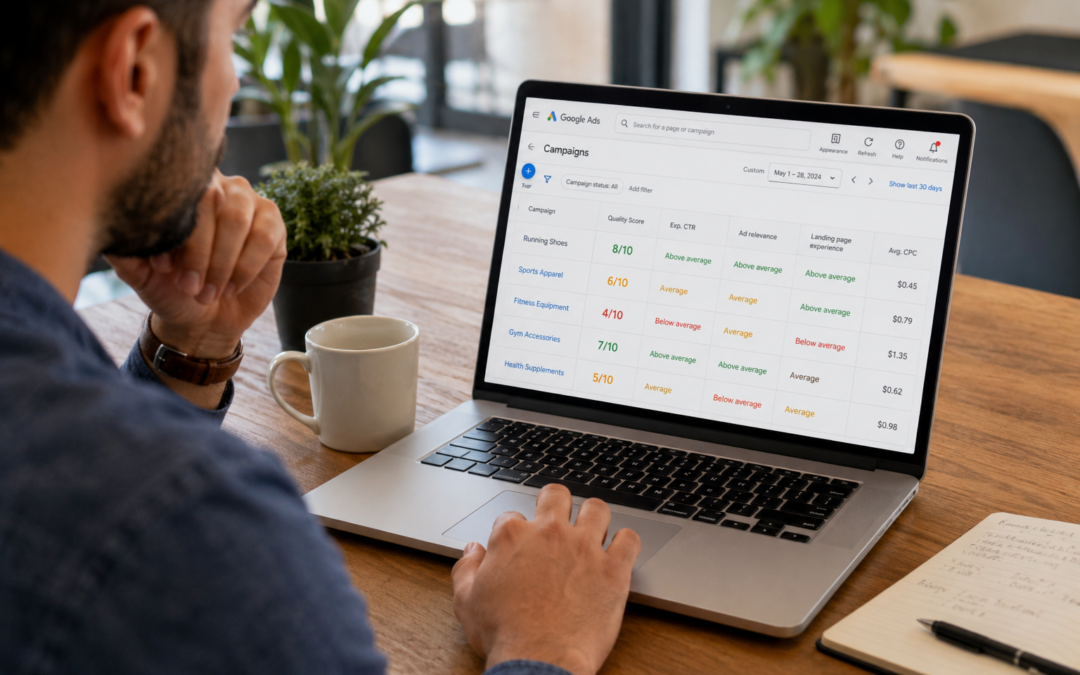
According to Google Ads Help, quality score is calculated from three components: expected click-through rate, ad relevance, and landing page experience. Each keyword receives a score on a 1 to 10 scale.
This score is a diagnostic signal, not a vanity metric. It exists to show how an ad’s quality compares with other advertisers competing for the same search.
Quality score works best as a tool for understanding ad quality, not something to chase for its own sake. The number matters because of what it reflects, not because of the number itself.
How quality score connects to what you actually pay
Quality score is not a direct input in the auction that decides which ad wins a given search. Instead, it feeds into ad rank, which combines with your bid to determine both position and cost.
A higher quality score can lower cost per click for the same ad position, since a stronger score reduces how much bid strength is needed to win that spot.
This is why two advertisers bidding the same amount can end up paying noticeably different prices. The one with the higher quality score is often paying less for the same visibility.
The three components that build your score
Expected click-through rate reflects how likely an ad is to be clicked when it is shown, based on past performance for that keyword. A pay-per-click (PPC) account with a strong click history on a keyword tends to hold an advantage here over one just starting out.
Ad relevance measures how closely an ad matches the intent behind a search. A PPC ads agency structuring tightly themed ad groups is largely working to strengthen this exact component.
Landing page experience covers how relevant and useful the page is for someone who clicks the ad. A mismatch here can undercut strong ad copy and targeting.
What this looks like in practice for a PPC account
In practice, this pattern shows up often. An account was spending steadily but showing a consistently low quality score across its top keywords.
A closer review found the ad copy was strong and closely matched search intent, but the landing pages sent every click to a general product category page instead of the specific product being advertised.
Once ad copy and landing pages were aligned to the same specific offer, quality score improved across the account, and cost per click dropped for several of the highest-spend keywords. The account also saw click-through rate climb on its top keywords within a few weeks, which reinforced the improvement over time.
What to measure to improve quality score over time
Quality score by keyword is worth reviewing regularly, since account-level averages can hide a handful of keywords dragging down overall performance.
Click-through rate trend is the second signal. A keyword with declining click-through rate over time usually points to ad copy that no longer matches what people are searching for.
Landing page relevance rounds this out. Steady, gradual improvement over several weeks is the realistic expectation here, not a sudden jump in score.
Frequently asked questions
Advertisers tend to ask similar questions once they notice quality score affecting their account.
What is a good Google Ads quality score?
There is no single universal target, but scores in the upper half of the 1 to 10 scale generally reflect stronger ad quality relative to competing advertisers on the same keyword.
Can quality score change quickly?
It updates continuously, but meaningful shifts usually take time to show up, since the score reflects performance built up over recent searches rather than a single change.
Does quality score affect ad position, not just cost?
Yes. Quality score feeds into ad rank, which determines both position and cost, so a stronger score can improve visibility as well as lower cost per click.
What’s the fastest way to improve quality score?
Aligning landing pages more closely with ad copy and keyword intent is often the quickest lever, since mismatches here are usually the easiest to identify and fix.
Key Takeaways
– Google Ads quality score is built from expected click-through rate, ad relevance, and landing page experience.
– Quality score is not a direct auction input, but it shapes ad rank, which affects both cost and position.
– A higher quality score can lower cost per click for the same ad position.
– Landing page alignment is often the fastest lever for improving a weak score.
Know exactly what your ad spend is buying
If your cost per click keeps climbing even though your bids haven’t changed, quality score is often part of the reason why. Get an Audit to see exactly what’s shaping your costs and where the easiest improvements are.

