
by Research Team | Oct 15, 2026 | Digital Marketing Audits, PPC and Paid Ads, SEO
Business owners often reach for the cheaper, faster-sounding option when performance stalls. A search engine optimization (SEO) tune-up looks like the obvious first step.
The problem is that a tune-up was never designed to answer the question most business owners actually have. It fixes what it’s told to fix. It doesn’t diagnose what’s actually wrong.
What an SEO tune-up actually includes
A tune-up typically covers a narrow, fixed set of on-page fixes. Title tags, meta descriptions, and a handful of keyword adjustments make up most of the work.
It’s usually priced low and delivered fast, often by freelancers or bundled as an add-on to another service. That speed and price make it an easy first purchase.
The catch is scope. A tune-up addresses visible surface issues, not the underlying structural or cross-channel problems that are often the real source of stalled performance.
What a full digital marketing audit covers that a tune-up doesn’t
A full audit examines technical SEO health, content gaps, and backlink quality, not just the on-page elements a tune-up touches. That broader scope catches problems a tune-up was never built to find.
It also looks at cross-channel visibility. How SEO, pay-per-click (PPC) advertising, and conversion paths interact with each other matters more than any single channel viewed in isolation.
The output is a prioritized action plan tied to the business’s actual growth goal. A digital marketing audit tells a business what to fix first and why, not just what a generic checklist says to fix.
When a tune-up is the right call, and when it isn’t
A tune-up can make sense for a business with one small, known issue and no broader growth concerns. If the problem is specific and isolated, a targeted fix may be all that’s needed.
It’s the wrong call when the business doesn’t actually know why performance has stalled. A tune-up can’t diagnose a problem the business hasn’t identified yet.
That’s exactly where most stalled growth actually starts. The business feels something is off, but can’t point to a specific cause, which is a diagnosis problem, not a fix problem.
How to tell which one your business actually needs
If the business can describe the issue in one sentence, a tune-up may be enough. “Our meta descriptions are outdated” is a tune-up problem.
If performance has stalled without a clear cause, or the concern spans more than one channel, an audit is the better starting point. “Traffic looks fine but leads have dropped” is an audit problem.
The quick self-check comes down to this: can the issue be named specifically, or does it require investigation first? The answer usually points to the right option immediately.
In practice: what happens when a tune-up isn’t enough
Here’s a common scenario. A business paid for an SEO tune-up expecting it to fix a gap between traffic and leads.
The tune-up addressed on-page elements exactly as scoped, updating title tags and adjusting a handful of target keywords. It left the conversion path and PPC issues completely untouched, since neither had ever been part of what a tune-up covers.
A full digital marketing audit later identified the real gap: the problem was happening after the click, not before it. No amount of on-page tuning was ever going to fix that.
Frequently Asked Questions
Business owners weighing these two options tend to ask a few questions before deciding.
What’s the difference between an SEO tune-up and a digital marketing audit?
A tune-up fixes a known, narrow set of on-page issues. A digital marketing audit diagnoses problems across technical SEO, content, and other channels before recommending fixes.
Is an SEO tune-up enough to fix declining traffic?
It depends on the cause. If the cause is already known and isolated, a tune-up can help. If the cause isn’t clear, a tune-up won’t find it.
How do I know if I need a full digital marketing audit?
If performance has stalled without an obvious reason, or the concern touches more than one marketing channel, an audit is the better starting point than a targeted fix.
Does a digital marketing audit include SEO tune-up fixes too?
Yes. The fixes a tune-up would make often show up in an audit’s recommendations too, but within a broader diagnostic context that explains why they matter.
Key Takeaways
An SEO tune-up fixes a known, narrow set of on-page issues, while a digital marketing audit diagnoses problems across channels before recommending anything.
A tune-up works when the business already knows exactly what’s wrong. An audit works when the cause isn’t clear yet.
Choosing the wrong option usually means paying for a fix that addresses the wrong problem, while the actual cause goes unresolved.
If you’re not sure which one you need, that uncertainty is itself a sign worth a closer look. Get an Audit and get a clear picture of where your traffic is going.

by Research Team | Oct 13, 2026 | Digital Marketing Audits, PPC and Paid Ads, SEO
Scope creep rarely announces itself as a problem in a white-label partnership. It usually starts as a small, reasonable-sounding request.
Over time, that request quietly expands what the fulfillment partner is expected to deliver for the same fee. By the time anyone notices, the pattern is already established.
Where scope creep usually starts in white-label work
A client request that seems minor gets passed straight through to the fulfillment partner without being scoped first. No one decides whether it fits inside the existing agreement.
The agency often absorbs the extra work to avoid friction with the client, rather than pushing back or re-scoping the request. That instinct is understandable, but it sets a precedent that’s hard to reverse later.
Ambiguity in the original agreement makes this worse. When the contract doesn’t clearly separate included work from billable additions, every new request becomes a judgment call instead of a simple answer.
What a clear scope of work should define upfront
Deliverables need to be listed specifically, not described in vague categories like “ongoing SEO support.” Specificity now prevents disputes later.
The agreement should also define what counts as a revision versus a new deliverable. Without this distinction, a client asking for “one small change” can turn into a second draft with no additional cost attached.
Turnaround times and the number of feedback rounds included per deliverable belong in the same document. Agencies benefit from confirming this upfront with any white label marketing services partner they’re evaluating, not after work has already started.
How to handle a scope change once it’s already happening
Name the change plainly, to the client or the fulfillment partner, rather than letting it pass silently into the workflow. A direct conversation now is easier than an uncomfortable one later.
Quantify the impact. Explain what the change costs in time and what it moves on the timeline, rather than treating it as a favor with no real cost.
Decide together whether the change becomes a new line item or waits for the next phase. Either answer is fine, as long as it’s a decision instead of a default.
Keeping scope creep from damaging the agency-partner relationship
Scope conversations should happen between the agency and the fulfillment partner, not spill into the end client’s view of the relationship. The client doesn’t need to see the internal negotiation to get a clear answer.
A pattern of repeated scope changes signals a documentation gap worth revisiting, not a one-off exception to shrug off. If the same kind of request keeps showing up unscoped, the original agreement probably needs an update. The same principle applies to setting client expectations correctly from the start, which prevents confusion on the client side of a white-label relationship.
Regular check-ins between the agency and the fulfillment partner catch scope drift before it compounds. A quarterly review of what’s actually being delivered against what was originally agreed keeps both sides honest.
In practice: what unmanaged scope creep costs an agency
Here’s a common scenario. A white-label partnership absorbed several “quick” client requests over two quarters without ever adjusting the fee attached to the account.
Each request seemed small enough to justify on its own. By the end of the second quarter, the fulfillment partner was delivering noticeably more work for the same retainer, and margin on that account had quietly disappeared.
The fix wasn’t a difficult conversation after the fact. Documenting scope clearly from the start, and naming each change as it happened, would have caught the drift months earlier.
Frequently Asked Questions
Agencies managing white-label fulfillment relationships tend to ask a few questions once scope creep starts affecting margin.
What is scope creep in a white-label marketing partnership?
Scope creep happens when small, unscoped requests gradually expand what a fulfillment partner delivers without a matching change to the fee or agreement. It rarely starts as one dramatic shift.
How do I say no to a client request without damaging the relationship?
Quantify the impact instead of simply declining. Explaining what a change costs in time or timeline turns the conversation into a business decision rather than a confrontation.
Should scope changes always cost extra?
Not necessarily, but they should always be a decision rather than a default. Some changes fit naturally into the next phase of work without an added cost.
How often should agencies review scope with a white-label fulfillment partner?
A quarterly review is a reasonable cadence for most ongoing relationships. It’s frequent enough to catch drift early without adding unnecessary overhead.
Key Takeaways
Scope creep in white-label partnerships almost always starts small, through unscoped requests that quietly expand what’s delivered for the same fee.
A clear scope of work, defining deliverables, revisions, and turnaround times upfront, prevents most disputes before they start.
Naming a scope change plainly and quantifying its cost keeps the conversation a business decision instead of an uncomfortable confrontation.
If scope keeps drifting in your current fulfillment relationship, the fix is usually clearer documentation, not a harder conversation. Work With Me to build a white-label partnership with clear scope from the start.

by Research Team | Oct 11, 2026 | Digital Marketing Audits, PPC and Paid Ads
A pay-per-click (PPC) agency’s sales pitch and its daily work are often two different things. Knowing how to choose a PPC agency starts with the right questions.
Price and promises are easy to compare. Strategy, honesty, and reporting are harder to judge. But they decide whether a PPC agency actually delivers.
Choosing a PPC Agency: Questions About Strategy and Account Structure
Ask how the agency plans to build campaigns, ad groups, and keywords for this specific business. A generic template is a warning sign. A vague answer here usually means a generic plan follows.
Ask about the agency’s ongoing approach to negative keywords. Wasted spend on bad clicks is one of the most common problems in PPC management. It is also one of the easiest to prevent.
Ask how the agency chooses between manual and automated bidding. A good answer notes that both have a place. It depends on the campaign and the data at hand.
A strong answer also covers how the agency checks the account over time. A strategy should not be set once and left untouched for months. Not every PPC ads agency will explain this clearly, which is exactly why the question matters.
Questions About Reporting and Transparency
Ask how often reports arrive and what they cover beyond clicks and impressions. A useful report ties results back to the original business goal, not just platform activity.
Ask whether the business keeps full access to its own ad account and data at all times. An agency that resists this question wants more control than it should have.
Ask how cost per lead and return on investment get tracked and shared. Cost per click alone doesn’t say whether the campaign is working.
Questions About Experience and Fit
Ask whether the agency has worked with businesses of a similar size, budget, or industry. Relevant experience shortens the learning curve a lot.
Ask who will manage the account day to day. This should not just be whoever showed up on the sales call. The person managing the account matters more than the name on the door.
Ask what the agency does when a campaign underperforms. This answer says more about an agency’s process than any success story will.
Red Flags That Should End the Conversation
Guaranteed results or promised timelines are the clearest warning sign. No agency can guarantee outcomes in a platform it doesn’t control. Any agency that claims otherwise is overselling.
Vague answers about account structure or reporting cadence are a second red flag. Clear, specific answers are reasonable to expect before signing a contract.
Reluctance to share a sample report or discuss account ownership is a third red flag. Honesty before the relationship starts rarely improves after it.
A fourth red flag is pressure to sign quickly. A confident agency lets a prospective client take time to compare options.
In Practice: What a Mismatched PPC Agency Costs a Business
Here’s a common scenario. A business chose an agency based on price alone. It skipped questions about strategy and reporting.
Months later, an audit found no negative keyword strategy had ever been set up. The account had been paying for bad clicks the whole time. No one had caught it.
The fix wasn’t complicated. Asking the questions above before signing, not after the first invoice, would have caught the gap right away.
Frequently Asked Questions
Business owners weighing PPC agencies tend to ask a few questions before committing to one.
What questions should I ask before hiring a PPC agency?
Ask about campaign strategy, negative keyword management, reporting cadence, and who manages the account day to day. These four areas reveal more than a sales pitch ever will.
How much should a PPC agency cost?
Costs vary widely depending on ad spend, industry, and scope of work. Rather than comparing price alone, weigh the cost against how specific the agency’s plans are.
Should I choose a PPC agency or manage ads in-house?
It depends on available time and skill. An agency makes sense when a business needs steady attention and know-how that in-house staff can’t easily provide.
What’s a red flag when evaluating a PPC agency?
Guaranteed results, vague answers about reporting, and reluctance to share account access are the clearest warning signs. Any one of these is worth a second look before signing.
Key Takeaways
Choosing a PPC agency comes down to specific questions about strategy, reporting, and account ownership, not price and promises alone.
Guaranteed results and vague answers about reporting are the clearest red flags during the evaluation process.
Asking these questions before signing a contract catches problems that are far more expensive to fix after the first invoice.
If you’re evaluating PPC agencies right now, we’re happy to be one of the conversations. Schedule a Call and we’ll talk through your goals with no pressure to sign anything.

by Research Team | Oct 5, 2026 | Digital Marketing Audits, PPC and Paid Ads, SEO
Choosing a fulfillment partner under time pressure, without proper vetting, tends to cost far more later than the time saved upfront.
Here is why vetting a white-label partner matters more than it seems at first, which criteria actually deserve attention, and the red flags worth taking seriously during due diligence.
Why vetting a white-label partner matters more than it seems at first
A fulfillment partner’s work becomes the agency’s own reputation with the client. The client never sees the partner directly, but they experience every consequence of that partner’s quality and reliability.
Problems discovered after signing on are far more costly to fix than issues caught during vetting. Switching a fulfillment partner mid-relationship with an active client is disruptive, while a thorough vetting process upfront avoids that disruption entirely.
An agency evaluating white label marketing services for the first time often underestimates how much this early diligence matters, especially when under pressure to onboard a new client quickly.
What criteria actually matter when evaluating a partner
Quality of sample work is the most direct signal available. Reviewing actual deliverables, not just a sales pitch describing them, shows what a partner is genuinely capable of producing.
Communication responsiveness during the evaluation process itself is a strong predictor of what the relationship will feel like later. A partner who is slow or vague before signing tends to stay that way afterward.
Reporting capability rounds out the core criteria, alongside a partner’s ability to take on more volume as a client’s account grows — for example, adding capacity during a seasonal spike without a drop in turnaround time or quality.
There is a real difference between a partner who looks capable on a sales call and one who performs consistently once the relationship is actually underway. Vetting exists specifically to surface that difference before it becomes a problem.
Red flags worth taking seriously during due diligence
Vague answers about process are one of the clearest warning signs. A partner who cannot explain, specifically, how they handle a given service is unlikely to execute that service reliably.
No willingness to provide references or sample work is another red flag worth taking seriously. A legitimate partner with a track record should have no hesitation sharing evidence of that track record.
Unrealistic turnaround promises deserve scrutiny too. A partner promising faster delivery than seems reasonable for the scope of work described is either overpromising or planning to cut corners somewhere.
A partner unwilling to be transparent during vetting, when they have every incentive to make a good impression, is unlikely to become more transparent once the relationship is underway and that incentive has faded.
What this looks like in practice for an agency
An agency signed on with a fulfillment partner quickly to meet sudden client demand, skipping reference checks and moving straight from a sales call to a signed agreement.
Within the first month, quality issues and slow communication became apparent, and the agency found itself managing the fallout with its own client while also trying to manage the partner relationship itself.
For its next partner search, the agency built a proper vetting process: reviewing sample work in detail, checking references directly, and testing communication responsiveness before signing anything.
The second partnership avoided nearly all the problems the first one had produced. The upfront time spent vetting was a fraction of the time the first mistake had ultimately cost.
What to confirm before signing an agreement
Sample work should be reviewed directly, not just described. Actual deliverables reveal far more about quality than any pitch ever will.
References should be checked, not just requested. A reference conversation, even a brief one, tends to surface details a sales process alone would never reveal.
Communication should be tested during the sales process itself, since responsiveness and clarity at this stage tend to predict what the working relationship will actually feel like.
Reporting capability should be confirmed before signing, not assumed. A partner should be able to show, concretely, how they will report on work delivered under the agency’s brand.
Vetting takes real time upfront, but it prevents far more time lost fixing problems after a partnership is already underway and a client is already affected.
Frequently asked questions
Agency owners tend to ask similar questions when searching for a white-label fulfillment partner for the first time.
What questions should I ask a potential white-label partner?
Questions about their process for the specific service needed, their reporting approach, their typical turnaround times, and their ability to take on more work as an account grows are all worth asking directly.
Should I ask for references before signing on?
Yes. A brief conversation with an existing client of the fulfillment partner tends to reveal details a sales process alone will not.
What’s a red flag that a white-label partner isn’t a good fit?
Vague answers about process, reluctance to share sample work or references, and turnaround promises that seem unrealistic for the scope described are all worth taking seriously.
How long should the vetting process take?
A week or two for a thorough review is reasonable for most agencies, though the exact timeline depends on how many potential partners are being compared.
Key Takeaways
– A fulfillment partner’s quality becomes the agency’s own reputation with the client.
– Sample work, communication responsiveness, reporting capability, and room to grow with your account are the core criteria worth evaluating.
– Vague process answers, no references, and unrealistic turnaround promises are red flags worth taking seriously.
– Vetting takes time upfront but prevents far more time lost fixing problems after a partnership is underway.
Vet your next fulfillment partner the right way
A rushed partner search tends to cost more than a thorough one ever would. Work With Me to build a vetting process that protects your agency and your clients from the start.

by Research Team | Oct 3, 2026 | Digital Marketing Audits, Marketing ROI
A business can pay for a full audit and still not know if anything really improved. That happens when no baseline is set first. Setting marketing audit KPIs before the work starts is what prevents this.
Here is why KPIs need to exist before an audit starts. This section also covers what makes a KPI useful, and why an early baseline matters more than most businesses expect.
Why Marketing Audit KPIs Need to Exist Before You Start
A digital marketing audit without set KPIs can turn up a long list of findings. But there is no clear way to know which ones matter most to the business that ordered it.
KPIs give an audit a lens to sort findings through. Without that lens, every finding can look equally urgent. Some clearly matter more than others.
Setting KPIs first turns the audit from a general health check into a focused review. That review centers on the outcomes the business actually cares about.
What Makes a KPI Useful for This Purpose
A useful pre-audit KPI has three traits. It is specific. It ties to a real business outcome. And it can be measured with data the business already has, or can easily get.
Cost per lead is a strong example. It connects marketing activity to a number the business already tracks, or can track without much extra work.
Organic traffic to specific service pages works well too. It isolates how those key pages perform, instead of looking at the whole site’s traffic at once.
Conversion rate by channel rounds this out. It shows not just how much traffic shows up, but how well each channel turns that traffic into something the business wants.
Setting a Baseline Before the Audit Begins
A baseline matters for one reason. Without one, there is no reliable way to know if changes made after the audit actually helped.
A common mistake is starting an audit and only pulling baseline numbers after fixes are already underway. By then, the numbers reflect a moving target, not a clean starting point.
Pulling baseline numbers for each KPI before the audit starts gives a business something solid to compare against later.
What This Looks Like in Practice for a Business
A business once commissioned an audit with vague goals. It asked for a general review, with no specific KPIs set beforehand.
The audit turned up dozens of findings. Many were legitimate. But the business struggled to decide what to fix first, and had no clean baseline to measure progress against.
The same business later set two clear KPIs before its next audit: cost per lead, and organic traffic to its core service pages. It also pulled current baseline numbers for both.
That audit returned a tighter set of findings, tied directly to those two goals. The business could clearly see real change in both numbers within the following quarter. The first audit had never made that kind of tracking possible.
What to Have Ready Before Commissioning an Audit
Two or three clear KPIs are usually enough. Any more than that tends to dilute focus rather than sharpen it. An audit built around too many priorities ends up prioritizing nothing at all.
Baseline numbers for each KPI should be pulled before the audit begins. This holds true even if the numbers aren’t strong yet. The goal is a clean starting figure, not a flattering one.
A clear sense of which outcomes matter most, beyond the KPIs themselves, helps frame the audit’s priorities from day one. Otherwise, that framing gets sorted out after the fact.
This kind of prep takes very little time. But it changes how useful the final audit report ends up being.
Frequently Asked Questions
Business owners tend to ask similar questions when getting ready for their first marketing audit.
What KPIs should I set before a marketing audit?
Cost per lead, organic traffic to specific service pages, and conversion rate by channel are solid starting points. Each one ties directly to something the business can measure.
Do I need data before commissioning an audit, or will the audit provide it?
Both matter. But having baseline numbers ready before the audit starts makes it much easier to measure whether the changes afterward actually worked.
Can an audit still be useful without set KPIs?
Yes. But it tends to be less focused, and harder to measure against later. A general audit will still turn up real issues. It just lacks a clear lens for ranking which ones matter most.
How many KPIs should a business track for an audit?
Two or three focused KPIs tend to work better than a long list. Too many priorities can make it harder to act on what the audit finds.
Key Takeaways
– An audit without set KPIs tends to turn up findings with no clear sense of which ones matter most.
– A useful KPI is specific, tied to a real business outcome, and measurable with data already on hand.
– A baseline pulled before the audit starts is what makes progress afterward actually measurable.
– Two or three focused KPIs work better than a long list for ranking an audit’s findings.
Set the Right Goals Before You Get an Audit
An audit is only as useful as the goals it gets measured against. Get an Audit after setting clear marketing audit KPIs, and see exactly how much progress you’re actually making.
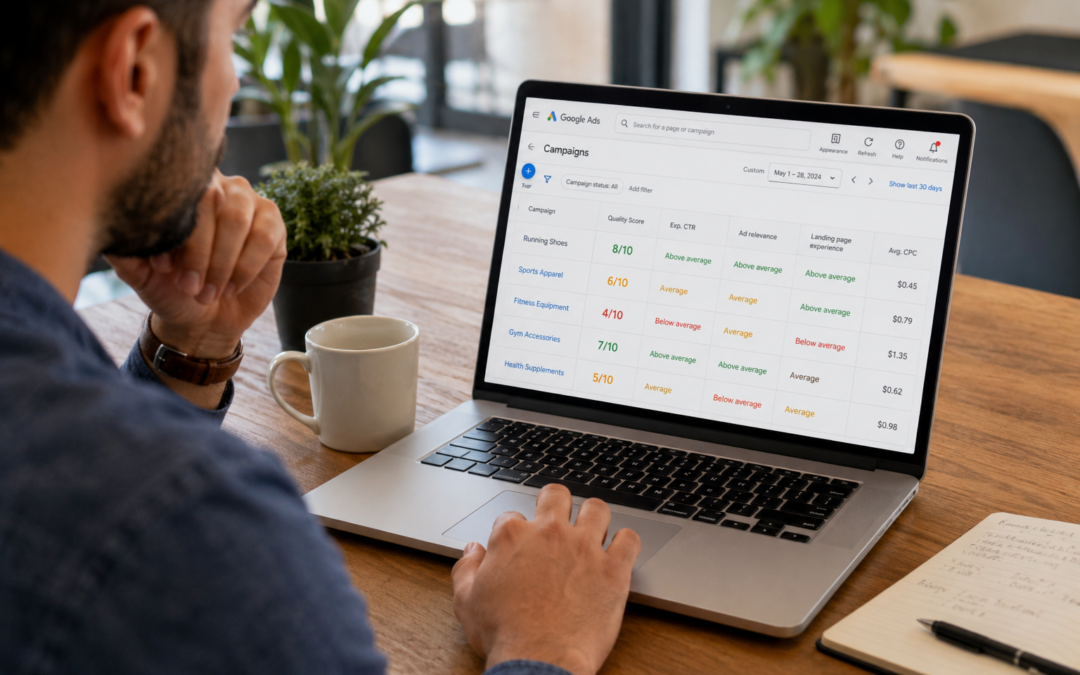
by Research Team | Sep 9, 2026 | Digital Marketing Audits, PPC and Paid Ads
Two businesses can bid the same amount on the same keyword and pay very different costs per click. Google Ads quality score is usually why.
This post covers what quality score actually measures, how it connects to what you pay, and what to do to improve it over time.
What Google Ads quality score actually measures
According to Google Ads Help, quality score is calculated from three components: expected click-through rate, ad relevance, and landing page experience. Each keyword receives a score on a 1 to 10 scale.
This score is a diagnostic signal, not a vanity metric. It exists to show how an ad’s quality compares with other advertisers competing for the same search.
Quality score works best as a tool for understanding ad quality, not something to chase for its own sake. The number matters because of what it reflects, not because of the number itself.
How quality score connects to what you actually pay
Quality score is not a direct input in the auction that decides which ad wins a given search. Instead, it feeds into ad rank, which combines with your bid to determine both position and cost.
A higher quality score can lower cost per click for the same ad position, since a stronger score reduces how much bid strength is needed to win that spot.
This is why two advertisers bidding the same amount can end up paying noticeably different prices. The one with the higher quality score is often paying less for the same visibility.
The three components that build your score
Expected click-through rate reflects how likely an ad is to be clicked when it is shown, based on past performance for that keyword. A pay-per-click (PPC) account with a strong click history on a keyword tends to hold an advantage here over one just starting out.
Ad relevance measures how closely an ad matches the intent behind a search. A PPC ads agency structuring tightly themed ad groups is largely working to strengthen this exact component.
Landing page experience covers how relevant and useful the page is for someone who clicks the ad. A mismatch here can undercut strong ad copy and targeting.
What this looks like in practice for a PPC account
In practice, this pattern shows up often. An account was spending steadily but showing a consistently low quality score across its top keywords.
A closer review found the ad copy was strong and closely matched search intent, but the landing pages sent every click to a general product category page instead of the specific product being advertised.
Once ad copy and landing pages were aligned to the same specific offer, quality score improved across the account, and cost per click dropped for several of the highest-spend keywords. The account also saw click-through rate climb on its top keywords within a few weeks, which reinforced the improvement over time.
What to measure to improve quality score over time
Quality score by keyword is worth reviewing regularly, since account-level averages can hide a handful of keywords dragging down overall performance.
Click-through rate trend is the second signal. A keyword with declining click-through rate over time usually points to ad copy that no longer matches what people are searching for.
Landing page relevance rounds this out. Steady, gradual improvement over several weeks is the realistic expectation here, not a sudden jump in score.
Frequently asked questions
Advertisers tend to ask similar questions once they notice quality score affecting their account.
What is a good Google Ads quality score?
There is no single universal target, but scores in the upper half of the 1 to 10 scale generally reflect stronger ad quality relative to competing advertisers on the same keyword.
Can quality score change quickly?
It updates continuously, but meaningful shifts usually take time to show up, since the score reflects performance built up over recent searches rather than a single change.
Does quality score affect ad position, not just cost?
Yes. Quality score feeds into ad rank, which determines both position and cost, so a stronger score can improve visibility as well as lower cost per click.
What’s the fastest way to improve quality score?
Aligning landing pages more closely with ad copy and keyword intent is often the quickest lever, since mismatches here are usually the easiest to identify and fix.
Key Takeaways
– Google Ads quality score is built from expected click-through rate, ad relevance, and landing page experience.
– Quality score is not a direct auction input, but it shapes ad rank, which affects both cost and position.
– A higher quality score can lower cost per click for the same ad position.
– Landing page alignment is often the fastest lever for improving a weak score.
Know exactly what your ad spend is buying
If your cost per click keeps climbing even though your bids haven’t changed, quality score is often part of the reason why. Get an Audit to see exactly what’s shaping your costs and where the easiest improvements are.

